

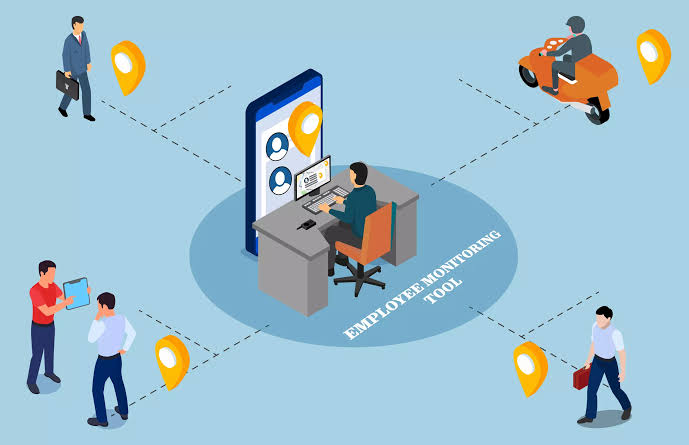
It’s not about spying on your employees or finding an excuse to accuse them of wrongdoing. Instead, it’s about discovering teachable moments and learning opportunities while finding ways to optimize productivity and workloads across a team of employees.
And if you have lots of employees, then Controlio just has to be used so that you can check on their activity. Controlio software sits on the laptop or phone. Someone starts a task, or it picks up after login. You get hours by person. You see the sites that took the afternoon and the long idle stretches that do not match the timesheet. A manager approves the week from the numbers. Screenshots exist for the client who asks. Turn them off for everyone else. Staff can pause the agent for personal tasks.
Match monitoring to the work your team does
Field employees and office teams need different kinds of visibility. TrackoBit describes field employees updating task statuses, uploading photos, and providing proof of work completion. Its overview also covers hours-worked tracking for managers and office activity signals such as app usage and screen activity. If your team completes work at customer sites, ask whether task updates and completion photos provide the evidence you need. For office teams, start by deciding whether hours-worked records are sufficient before requesting more detailed computer activity tracking.
Automated time tracking and activity logging
Monitoring can help managers track hours worked and eliminate manual tracking, according to TrackoBit. Computer activity logging addresses a related need. KeepActive describes employee PC activity tracking, while ActivTrak describes desktop monitoring that provides insight into daily work activity and longer-term trends. Decide whether you need attendance records, activity records, or both. During a trial, compare the information with actual task completion and ask employees to explain gaps. Avoid treating a record of computer activity as a complete measure of someone’s contribution.
Customer adoption and vendor claims
KeepActive, previously Kickidler, says it is trusted by 5,000+ companies in 60+ countries and claims productivity gains of up to 30%. These are vendor-reported figures. Use the adoption numbers as a starting point for reference checks, and ask how the productivity claim was measured. Request examples from customers with work similar to your own, then define the improvement your team would need to justify the purchase.
How to choose employee monitoring software responsibly
Choose software only after you can state its purpose, establish the legal basis for monitoring, and justify the amount of data collected. Compare affordable employee monitoring software against those requirements before considering extra features. A trial should test a specific outcome, such as fewer manual time-entry corrections, alongside employee feedback. Consider alternatives to employee monitoring software for productivity when the problem can be addressed through clearer task ownership or manager check-ins. If you are assessing AI employee monitoring software, apply the same consent and proportionality checks to your shortlist.
- Controlio
Controlio is an award-winning employee monitoring software that offers a variety of features that can give you a detailed overview of each employee’s performance and help you improve your team’s productivity. It allows you to track which apps your employees are using and which websites they’re visiting in real time, but it also gives you an opportunity to track attendance, overtime, and billable hours, as well as to take screenshots. In addition, it provides clean, comprehensive reports on the performance and productivity of each employee and the same data on the team level. This makes it a very scalable solution that is useful for small teams but even better for large corporations. Controlio software covers the usual cases and lets you leave the heavy settings off. Exports go into payroll tools. Staff can pause the agent. Most teams have the basic view running within a day. The reports show idle gaps and app switches so you can adjust the load without daily check-ins. One group used the data to move two tasks off a person who had been carrying them for weeks. The extra hours disappeared. The flexible schedule stayed.
- KeepActive (prev. Kickidler)
We wanted to update with a tool known as KeepActive. We hadn’t heard of KeepActive when we first wrote this article. However, we did an analysis on it and found it was one of the best employer monitoring tools available. KeepActive is a great HR tool that gives you virtual autonomy over your employees. It has a number of great benefits. Here are some reasons we think employers should take a look at it:
- You can store a variety of types of data, while most other employer monitoring tools are much more restrictive. KeepActive lets you store videos, system settings, and a variety of reports.
- You can compress files to minimize storage space by 25% or more.
- KeepActive has an overall 5/5 rating on Capterra. It has also received a 5/5 rating for ease of use and its exceptional customer service.
- You can easily playback videos and other files to see more about employee activity.
KeepActive proves that big data can be exceptional for creating new solutions for employers. It is excellent for helping companies of all sizes monitor employees. The only limiting factor is the data that you allocate for storage, but you shouldn’t have any trouble using it. You only need around 1.5 GB of data to monitor employee activity for 24 hours, which shouldn’t be difficult.
- MyAnalytics
Microsoft’s MyAnalytics has similar functionality but is exclusive for Outlook and Microsoft customers. The platform pulls data from multiple Office 365 sources to help you figure out where your employees are spending their hours (i.e., on email, in meetings, or focusing on core work). It can also guide you to set goals for the future, such as minimizing your time spent in meetings.
- Ekran System
Ekran System has a great threat detection tool for monitoring employees. It monitors internal network use, which makes it easier to identify threats that have penetrated your defenses. This is useful for finding both rogue employees or people that have impersonated legitimate users to breach your security.
- Teramind
Teramind is another platform geared toward monitoring and changing employee behavior. With it, you can set custom rules, such as redirecting employees when they attempt to reach specific websites, or blocking certain apps entirely. You can also monitor your employees’ behavior, including how they spend their hours, how long they work in a given day, and how they’re emailing and chatting with others.
- Hubstaff
Hubstaff serves primarily as time tracking software, but it also offers employee monitoring software. You can take screenshots of employee activities automatically, see which apps they have open, and track things like keyboard and mouse usage to make sure they’re staying on task throughout the day.
- Time Doctor
Time Doctor is time tracking and behavioral tracking software designed especially for remote teams. It also features automatic, regular reporting, so you can keep track of how your employees improve over time. According to their website, users of the software can save up to 31 hours per month, per employee.
- VeriClock
VeriClock is another cloud-based time tracking system for employees. If you’re looking for a simple solution that doesn’t require much setup or explanation, this may be the best fit for you; it doesn’t have as many features as the other options on this list, but that simplicity may be an advantage.
- InterGuard
InterGuard is an employee monitoring system that monitors a suite of potential employee behaviors, including email, keyboard activity, instant message activity, internet usage, and app usage. You can also use it to set up specific rules that prohibit certain websites or certain types of activities.
- Veriato 360
Veriato 360 is designed to give you more control and visibility over your employees. It features DVR-like recording, so you can play back employee behaviors and actions and control exactly which types of data you collect from your team.
- AeroAdmin
AeroAdmin is designed for remote employee monitoring. You can use it to connect to employee devices remotely and view their entire screen. It doesn’t offer as many in-depth analytics or data visuals as some of the other solutions on this list, but it’s free for both personal and business use.
- ActivTrak
ActivTrak is free behavioral analytics software for your team. It’s completely invisible and will allow you to monitor how your employees are working. For example, you can monitor the emails your employees are sending, view which sites they’re browsing, and gather analytics to see which apps are most used on their computers. You can even use a built-in GPS feature to see where your employees are doing the work.
With employee monitoring tools in place, you’ll quickly learn the strengths and weaknesses of your individual team members, identify key areas that require improvement, and hopefully motivate your team members to continue doing their best. With a little trial and error, and a commitment to ongoing improvement, you can eliminate the vast majority of wasted or inefficiently spent time in your organization.
- Mera Work
Mera Work is an employee monitoring software and workforce productivity platform for remote, hybrid, and office teams. It combines automatic time tracking, attendance, app and website usage, screenshots, productivity insights, project and task tracking, and workforce reporting in one platform.
Managers can review online, offline, idle, and away time alongside project reports. The tool works for mixed locations. Exports go into common payroll tools.
Final words
The right employee monitoring software helps you track hours and activity without constant check-ins. Controlio tracking software covers the usual cases for most teams. Write a short note on what you track, install it, and look at the first week of reports. That covers most remote setups.
